Basic Git Commands - Version Control
Essential git commands every developers need to know.

What is Git?➟ Git is a distributed version-control system for tracking changes in source code during software development. It is designed for coordinating work among programmers, but it can be used to track changes in any set of files. Its goals include speed, data integrity, and support for distributed, non-linear workflows. (Wikipedia)➟ Every developers need to know the following ones, they are basic commands. I recommend you to read Pro Git book if you want to study version control.
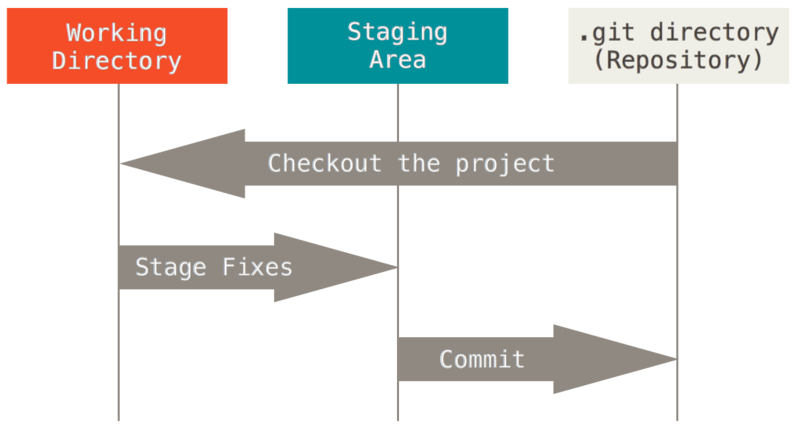
The image is from git-scm.com.
CREATE
➟ From existing data
$ cd ~/your-project-directory$ git init$ git add .➟ From existing repository
$ git clone ~/existing-repo-dir ~/new-repo-diror$ git clone yourname@host:project.git➟ To add new remote
$ git remote add UPDATE
➟ Fetch latest changes from origin
$ git fetch➟ Pull latest changes from origin
$ git pull➟ Applying the patch
$ git am patch_dir➟ Resolve the conflict if it happens$ git am -resolve
PUBLISH
➟ Commit all local changes
$ git add .$ git commit -m "Changes notes"➟ Prepare the patch for others
$ git format-patch origin➟ Tag version or milestone
$ git tag ➟ Push local changes to origin
$ git push [origin] [branch]BRANCH
➟ Switch to the branch
$ git switch or$ git checkout ➟ Merge dev to master
$ git checkout master$ git merge dev➟ Create branch based on HEAD
$ git branch ➟ Create branch based on another
$ git branch ➟ New branch
$ git branch ➟ Move current branch to new branch
$ git branch -M ➟ Delete branch
$ git branch -d SHOW
➟ File changes
$ git status➟ Changes to tracked files
$ git diff➟ Changes between commit-ids
$ git diff id-one id-two➟ History of Changes
$ git log➟ All local branches
$ git branch➟ Remote detail
$ git remote -v
- wikipedia.org
- git-scm.com
- Pro Git