Introduction to Java
Introduction to Java Language, Technology and Platform. Learn Java programming with Alto's Blog.
Introduction
Sun Microsystems, Inc. released Oak as Java which is designed by James Arthur Gosling (Dr.Java, Canadian computer scientist) in 1995. Java is a high-level object-oriented programming (OOP) language and it can also be regard as a platform in itself (actually not a platform) because of its platform independence and java virtual machine (JVM). Java language and its JVM are known as Java Technology (both a programming language and a platform). The terms "Java Virtual Machine" and "JVM" mean a Virtual Machine for the Java platform. The Java platform has two components: the Java Virtual Machine and the Java Application Programming Interface (API).
Java : object-oriented programming language.
Java Technology : Java and JVM.
Java Platform : JVM and JAPI.
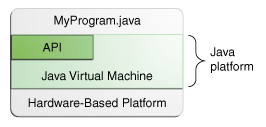
The image is from oracle.com.
Platforms of Java language
There are four platforms of the Java programming language:
1. Java Platform, Standard Edition (Java SE)
2. Java Platform, Enterprise Edition (Java EE)
3. Java Platform, Micro Edition (Java ME)
4. Java FX
For more detail, read Oracle documentations.
How it works
Java is platform independence but JVM is platform dependent. Compiling *.java will produce *.class and it runs under JVM which is native to not only java language but also operating system (OS). As a platform-independent environment, the Java platform can be a bit slower than native code. However, advances in compiler and virtual machine technologies are bringing performance close to that of native code without threatening portability. Java platform offers JRE and JDK to run java program. JRE is java runtime environment and JDK is java development kit. JRE is for normal users (end users) who want to run java program in their computer. JDK is for java programmer and once you installed it you don't need to install JRE because JDK is superset of JRE which means JDK comes with its own JRE.
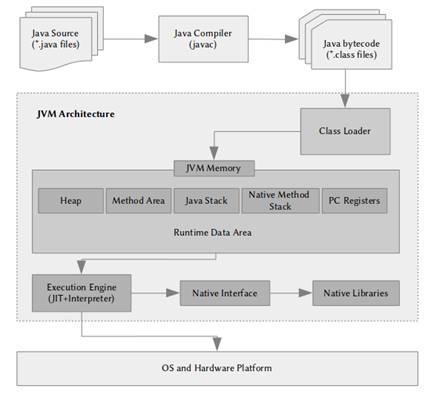
The image is from developer.com.
Set up for Java development
Download IDE (integrated development environment) and Java.
InteliJ IDEA (recommended IDE) : https://www.jetbrains.com/idea/download/
Eclipse (optional IDE for you) : https://www.eclipse.org/downloads/
Java (JDK) : https://www.oracle.com/java/technologies/downloads/
Stay tuned to self-study and learn Java programming with the help of this blog.